



Download Mod The Sims – Free Sims Mod Platform, Community, and Updates
Overview of Mod The Sims
Mod The Sims is an online hub dedicated to the thriving modding community surrounding The Sims franchise. Whether you’re playing Sims 4, Sims 3, or the classic Sims 2, the platform aggregates thousands of user‑generated mods, custom content, and gameplay videos in one easily searchable space. The site is completely free for casual visitors: you can browse, preview, and download mods without ever creating an account. Registered members enjoy extra perks such as the ability to comment on uploads, favorite creators, follow specific modders, and keep a personal download history that helps you rediscover old favorites.
The platform’s design embraces a minimalistic layout that loads quickly on any device, making it a perfect companion for gamers who want a seamless experience without the bloat of advertisements or unnecessary widgets. Content is neatly organized by game version and further filtered into categories like “Latest Picks,” “Popular Recently,” and “Top Rated,” allowing you to pinpoint the exact type of mod you need—be it new hairstyles, furniture packs, or gameplay overhauls. In addition to mods, Mod The Sims hosts a news feed that highlights the latest updates from EA and Maxis, as well as community‑driven playthrough videos that showcase how custom content can transform everyday gameplay.
While the platform does not currently feature built‑in content‑filtering tools, the active community self‑polices through comments and ratings, warning users of any potentially harmful files. This collaborative approach, combined with the site’s fast performance and cross‑platform accessibility, makes Mod The Sims an indispensable resource for both newcomers and veteran simmers looking to expand their virtual worlds.
Key Features That Set Mod The Sims Apart
- Extensive Library Across Three Generations – Over 10,000 mods covering Sims 4, Sims 3, and Sims 2, organized by game version for instant relevance.
- Free Access for All Users – No hidden fees; browse and download as many mods as you like without a subscription.
- Registered‑User Enhancements – Comment on uploads, add favorites, follow creators, and maintain a personal download history.
- Category‑Based Navigation – Filters such as “Latest Picks,” “Popular Recently,” “Top Rated,” and “Gameplay Overhauls” help you find exactly what you need.
- Community‑Driven News & Playthroughs – Stay updated with the latest franchise news and watch community videos that demonstrate mods in action.
- Minimalist, Fast‑Loading Design – Clean UI that reduces page‑load times on both desktop and mobile devices.
- Creator Upload Portal – Simple upload tools allow modders to share their work, receive feedback, and build a following.
- Forum & Discussion Boards – Registered members can participate in forums, ask for troubleshooting help, or suggest new mod ideas.
- Search & Tag System – Advanced search with tags (e.g., “hair,” “furniture,” “gameplay”) makes locating specific assets quick and intuitive.
- Responsive Support – Community moderators monitor comments for potential security concerns, offering an extra layer of safety.
Step‑by‑Step Installation and Usage Guide
1. Accessing the Site
Open your preferred web browser and navigate to modthesims.com. The homepage presents a clean dashboard with quick links to the three major game versions. No download or installation of a client is required; everything runs directly from the browser.
2. Browsing and Filtering Mods
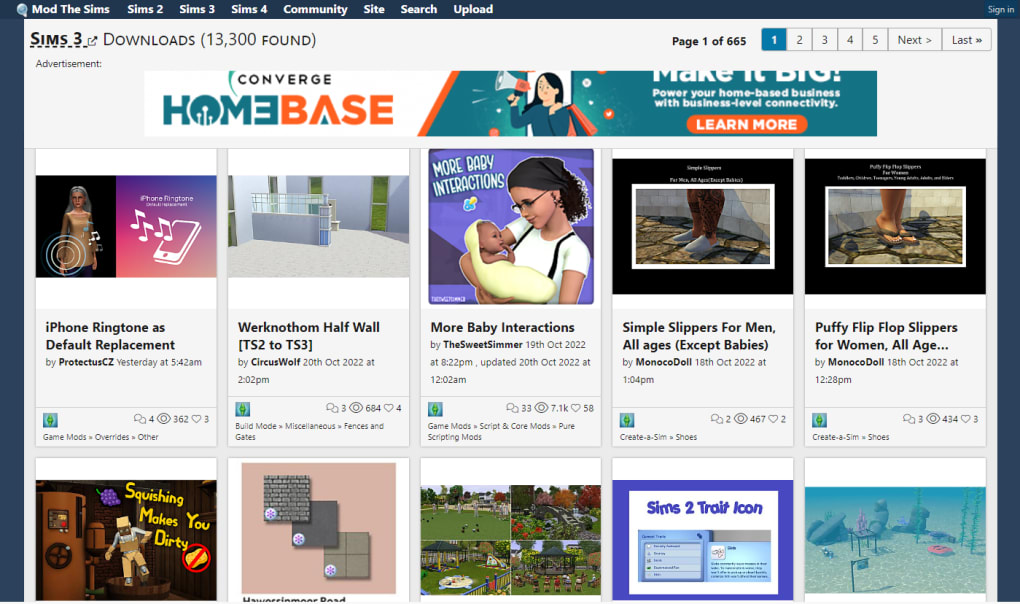
Click the tab for your game—Sims 4, Sims 3, or Sims 2. Use the category dropdowns (e.g., “Latest Picks,” “Popular Recently”) or type keywords into the search bar. The built‑in tag system refines results further, allowing you to focus on specific content types such as “hairstyles,” “clothing,” or “gameplay scripts.” Each mod thumbnail displays a short description, file size, and user rating.
3. Downloading a Mod
When you find a mod you like, click the “Download” button. For casual users, the file will download immediately. If you are a registered member, the download will be logged in your personal history, and you can optionally add the mod to your “Favorites” list for quick future access.
4. Installing the Mod in Your Game
All mods are provided as .zip or .package files. Extract the contents using a tool like 7‑Zip or WinRAR. For Sims 4, copy the extracted files into the Documents\Electronic Arts\The Sims 4\Mods folder.
For Sims 3, place them in Documents\Electronic Arts\The Sims 3\Mods\Packages. For Sims 2, copy to Documents\Electronic Arts\The Sims 2\Downloads. After moving the files, launch the game and enable custom content in the game settings if required.
5. Managing Your Library
Registered users can view a “My Downloads” page that lists every file you’ve obtained, with options to re‑download, delete, or add notes. This feature is especially handy for large mod packs where you may need to reinstall after a game update.
6. Community Interaction
If you have questions about a particular mod, scroll to the comment section beneath its page. Logged‑in members can post queries, share tips, or report issues. The community’s quick response time often resolves compatibility concerns within minutes.
Compatibility Overview, Pros, and Cons
Mod The Sims is a web‑based service, so it works on any operating system that can run a modern browser—Windows 10/11, macOS, Linux, Android, and iOS. The site’s responsive design automatically adapts to desktops, tablets, and smartphones, ensuring a smooth browsing experience whether you’re on a PC or a mobile device.
Pros
- Completely free access to a massive library of Sims mods.
- Clear categorization by game version and content type.
- Fast, minimalist UI that loads quickly on all devices.
- Registered‑user features (favorites, download history, commenting) enhance community engagement.
- Active community moderation helps flag unsafe files.
- Integrated news feed and playthrough videos keep you informed about the latest trends.
- Simple upload system encourages creators to share their work.
- Responsive design works equally well on Windows, macOS, Android, and iOS.
- Search and tag system speeds up the discovery of specific assets.
- No need for additional software; everything runs in the browser.
Cons
- There is currently no built‑in content‑filtering or parental‑control feature.
- Some mods may become incompatible after major game patches, requiring manual updates.
- Upload verification is community‑driven, which can occasionally let low‑quality files slip through.
- Large mod packs can take longer to download on slower internet connections.
- The site relies on user comments for security warnings, which may not be immediate.
Overall Rating: 4.5 out of 5 stars
Mod The Sims excels at delivering a comprehensive, free repository of custom content while fostering an active community. The lack of a formal safety filter is mitigated by vigilant user feedback, but new users should still exercise caution. For anyone serious about expanding their Sims experience, the platform is a must‑have.
Frequently Asked Questions & Final Thoughts
Is Mod The Sims safe to use?
While the site does not provide automated malware scanning, the community actively flags suspicious files in the comment sections. It’s recommended to read user feedback before downloading, and always keep a backup of your game saves.
Do I need to create an account to download mods?
No. All mods are freely downloadable without registration. Creating an account only unlocks additional features like commenting, favoriting creators, and tracking your download history.
Can I upload my own mods to Mod The Sims?
Yes. Once you register and verify your email, you gain access to the “Upload” portal where you can submit your custom content. Uploaded mods go through a community review process before becoming publicly visible.
What file formats are supported?
The majority of mods are distributed as .zip, .rar, or .package files. These can be extracted with any standard archive utility and placed in the appropriate game folder.
How often is new content added?
Mod The Sims receives daily uploads from creators worldwide. The “Latest Picks” and “Popular Recently” sections are refreshed every 24 hours, ensuring a steady flow of fresh content.
In summary, Mod The Sims stands out as a robust, free platform that bridges the gap between casual players and dedicated modders. Its intuitive design, extensive library, and vibrant community make it an essential tool for anyone looking to personalize their Sims experience. Ready to transform your virtual neighborhood? Visit Mod The Sims today, create a free account, and start downloading the mods that will bring your imagination to life!



.png)



